∙ iCore5 Navigation
∙ iCore5 Navigation

iCore5 Navigation
iCore5 Navigation
iCore5 Navigation
iCore5 Navigation
Duration
Duration
Duration
2024 / 03 - 05 (3 months)
2024 / 03 - 05 (3 months)
My Role
My Role
My Role
Product Designer
Product Designer
Responsibility
Responsibility
Responsibility
UI Design
UI Design
Project Overview
Project Overview
1
Team Goals
Team Goals
1
1
Our team plans to design a navigation and map experience for Ionex App scooter riders while organizing the system architecture to enable future development that integrates with hardware devices.
Our team plans to design a navigation and map experience for Ionex App scooter riders while organizing the system architecture to enable future development that integrates with hardware devices.
2
Roles and Deliverables
Roles and Deliverables
2
2
In this project, I worked closely with the product manager and three product designers. I was responsible for the entire UX and UI design process and deliverables, from defining the problem to delivering the final visual design assets to engineers.
In this project, I worked closely with the product manager and three product designers. I was responsible for the entire UX and UI design process and deliverables, from defining the problem to delivering the final visual design assets to engineers.
3
Project Challenges
Project Challenges
3
3
This project faced technical limitations, relying on third-party features and iterating core functions.
Task prioritization was key to launching the MVP on time.
This project faced technical limitations, relying on third-party features and iterating core functions.
Task prioritization was key to launching the MVP on time.
4
Project Takeaways
Project Takeaways
4
4
This project faced several technical limitations, requiring the use of third-party features while managing iterations of key product functions. Prioritizing tasks was crucial to ensure the timely delivery of the new features.
This project faced several technical limitations, requiring the use of third-party features while managing iterations of key product functions. Prioritizing tasks was crucial to ensure the timely delivery of the new features.

Background
Background
The Ionex App offers features like battery swapping, ride information, and billing to enhance the user experience.
To prepare for future integration with the dashboard system, we aim to develop a stable and flexible navigation interface. This includes utilizing the app’s battery swapping map to enhance navigation capabilities while ensuring seamless future.
The Ionex App offers features like battery swapping, ride information, and billing to enhance the user experience.
To prepare for future integration with the dashboard system, we aim to develop a stable and flexible navigation interface. This includes utilizing the app’s battery swapping map to enhance navigation capabilities while ensuring seamless future.
User Research
User Research

Before starting the project, we conducted surveys and multiple user interviews to understand user behaviors and needs.
Before starting the project, we conducted surveys and multiple user interviews to understand user behaviors and needs.
Research Insight
Research Insight
😥 Difficulty Switching Apps and Searching for Battery Swap Stations
😥 Difficulty Switching Apps and Searching for Battery Swap Stations
😥 Low Update Frequency, No Batteries Available at Swap Stations
😥 Low Update Frequency, No Batteries Available at Swap Stations
😥 Insufficient Personalized Route Options
😥 Insufficient Personalized Route Options
😥 Difficulty Viewing Maps During Rides
😥 Difficulty Viewing Maps During Rides
Our users face challenges when navigating, such as needing to switch to other maps to find charging stations and discovering no batteries available due to outdated map updates.
They also seek more personalized routes, like avoiding crowded areas or saving favorite locations, and want easier access to navigation information while riding without needing to stop, ensuring safety and convenience.
Our users face challenges when navigating, such as needing to switch to other maps to find charging stations and discovering no batteries available due to outdated map updates.
They also seek more personalized routes, like avoiding crowded areas or saving favorite locations, and want easier access to navigation information while riding without needing to stop, ensuring safety and convenience.
Hypothesis& Goal
Hypothesis& Goal
Hypothesis
Hypothesis
1
Provide real-time updates for swap stations and routes
Real-time updates for swap stations and routes
Live swap updates
1
1
By increasing real-time updates for battery swap stations and showing available battery info along with the scooter’s remaining charge, users can better plan trips and avoid arriving at stations with no available batteries.
By increasing real-time updates for battery swap stations and showing available battery info along with the scooter’s remaining charge, users can better plan trips and avoid arriving at stations with no available batteries.
2
Improve personalized navigation and customizable routes
Enhanced custom navigation
2
2
By offering personalized route options like avoiding congestion and choosing routes with more battery swap stations, along with saving favorite locations, users can plan more flexible and convenient trips.
By offering personalized route options like avoiding congestion and choosing routes with more battery swap stations, along with saving favorite locations, users can plan more flexible and convenient trips.
Our Goal
Our Goal
🎯 Launch a smooth navigation for phones and dashboards
🎯 Launch a smooth navigation for phones and dashboards
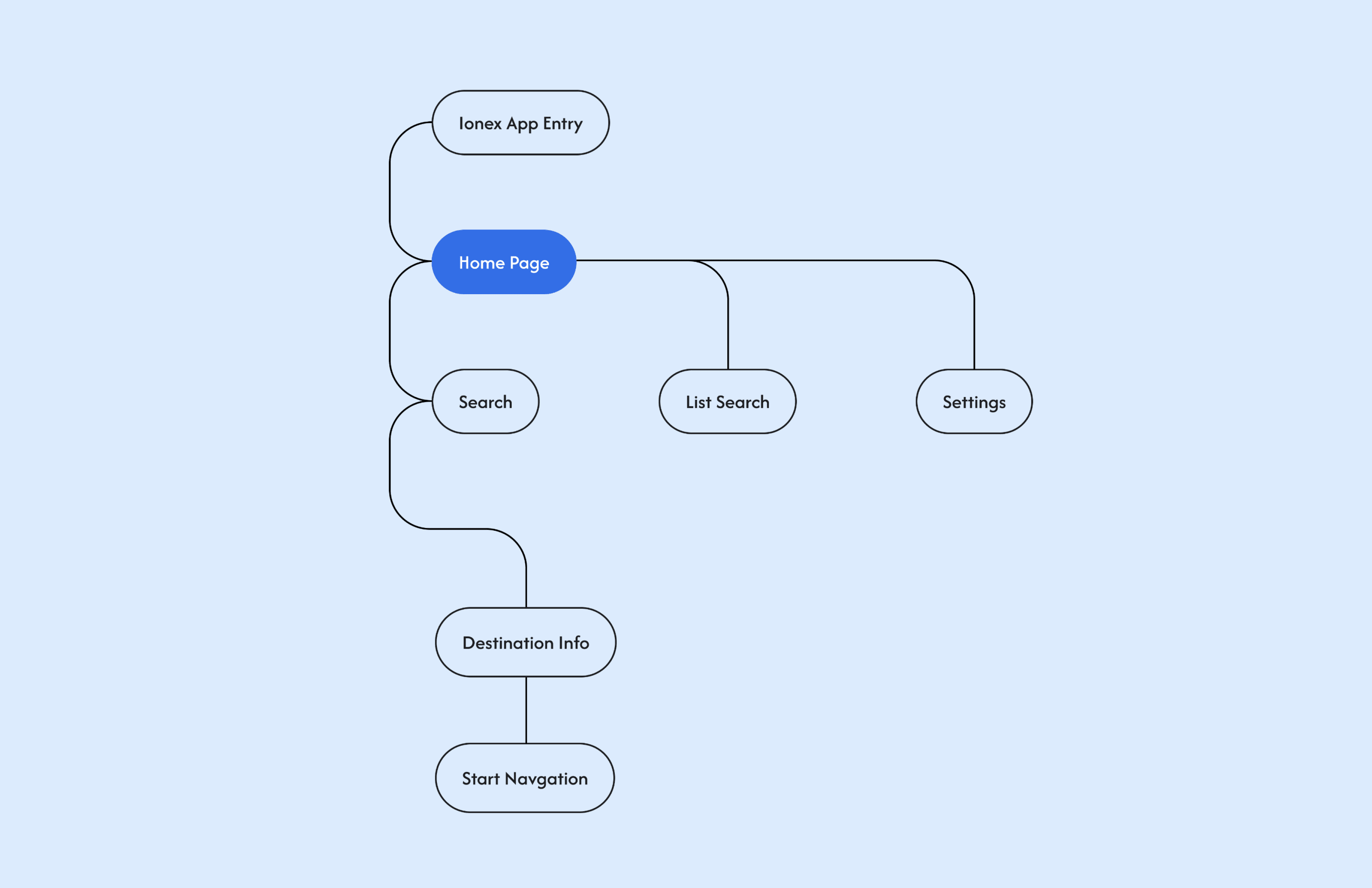
Information Architecture
Information Architecture
Typography &
Colors
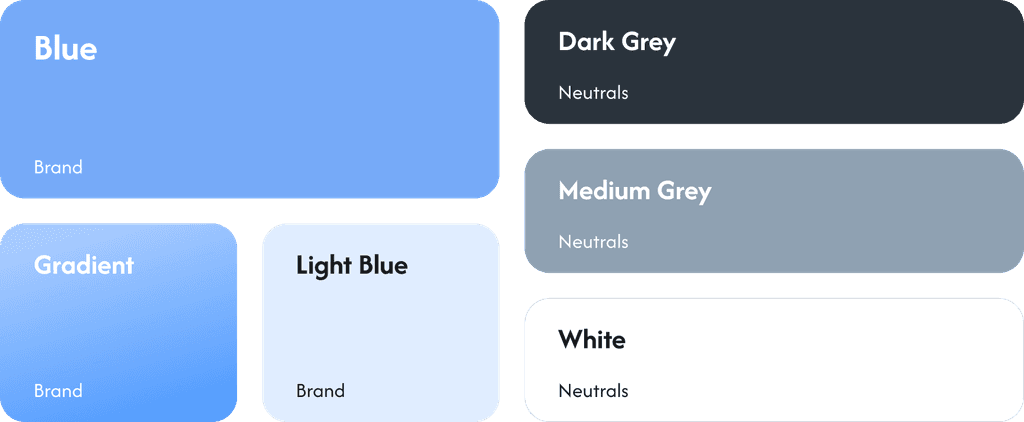
Typography & Colors
Font
Font
PingFang TC
PingFang TC
PingFang TC
Capital Letters
Capital Letters
ABCDEFGHIJKLMNOPQRSTUVWXYZ
ABCDEFGHIJKLMNOPQRSTUVWXYZ
Lowercase Letters
Lowercase Letters
abcdefghijklmnopqrstuvwxyz
abcdefghijklmnopqrstuvwxyz
Colors
Colors
Design System
Design System
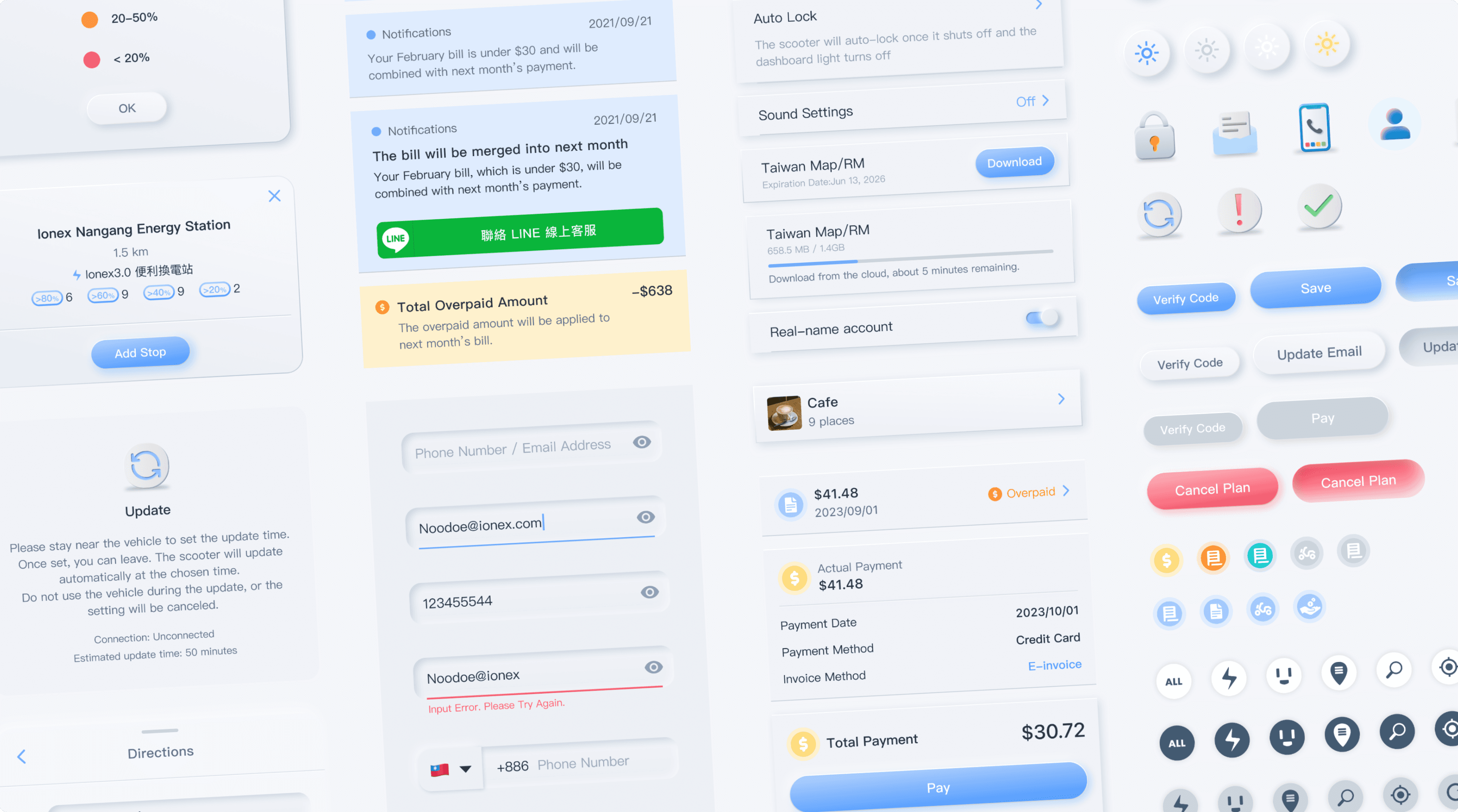
* The design components of Ionex Core5 Navigation are from the Ionex Design System or added based on its guidelines.
* The design components of Ionex Core5 Navigation are from the Ionex Design System or added based on its guidelines.
Design Deliverables
Design Deliverables
Principles
Principles
1
Clear
Clear
1
1
Visual cues and copy should be concise and clear, with consistent wording that is easy to understand. Font sizes should also be appropriate across different devices.
Visual cues and copy should be concise and clear, with consistent wording that is easy to understand. Font sizes should also be appropriate across different devices.
2
Consistency
Consistency
2
2
Cues and text should align with industry standards, enabling users to operate the app in a familiar way, while also adhering to Ionex App’s brand tone to ensure a consistent user experience.
Cues and text should align with industry standards, enabling users to operate the app in a familiar way, while also adhering to Ionex App’s brand tone to ensure a consistent user experience.
First Use Experience
First Use Experience
First-time users are required to set up units and download map resources before accessing the navigation feature. If the process is interrupted or exited, the next time iCore5 Navigation is launched, it will remain on the download screen.
First-time users are required to set up units and download map resources before accessing the navigation feature. If the process is interrupted or exited, the next time iCore5 Navigation is launched, it will remain on the download screen.
Home Page State
Home Page State
An interface with full content and smooth flow
An interface with full content and smooth flow
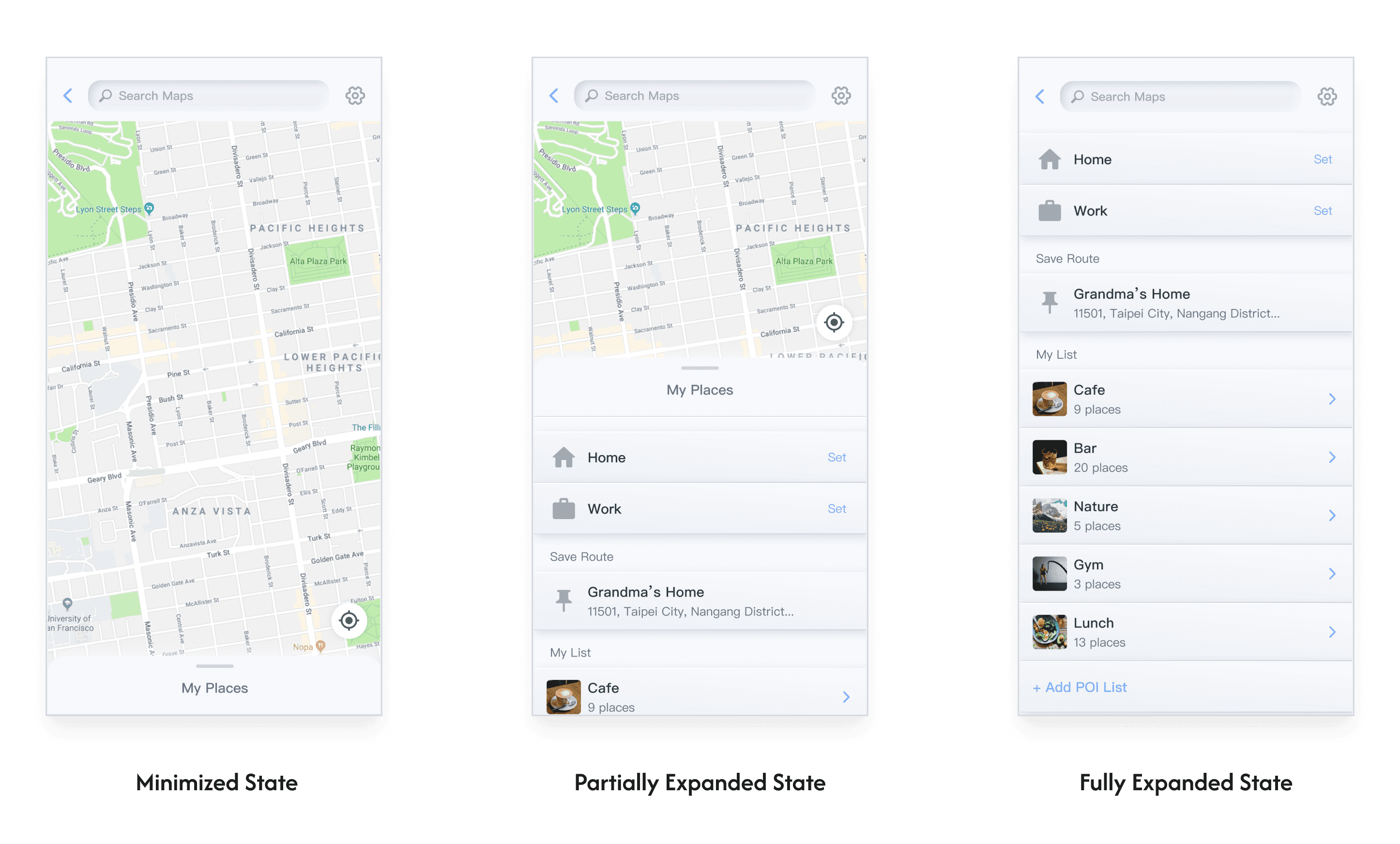
The home screen overlay offers three states that dynamically adjust based on user interactions, collapsing or expanding to meet different needs and enhance usability and efficiency.
The home screen overlay offers three states that dynamically adjust based on user interactions, collapsing or expanding to meet different needs and enhance usability and efficiency.
The three overlay states include: Minimized state, ideal for focusing on a full map view or nearby landmarks; Partially expanded state, allowing partial map information and quick access to frequently used actions ;Fully expanded state, designed for reviewing saved navigation options without distractions from other information.
The three overlay states include:
Minimized state, ideal for focusing on a full map view or nearby landmarks; Partially expanded state, allowing partial map information and quick access to frequently used actions ;Fully expanded state, designed for reviewing saved navigation options without distractions from other information.
Add Home / Work Adress
Add Home / Work Adress
One-click to take you home
One-click to take you home
The system provides quick options, allowing users to search or drag the map to add their own Home and Work landmarks. Once added, users can tap the landmark for quick navigation.
The system provides quick options, allowing users to search or drag the map to add their own Home and Work landmarks. Once added, users can tap the landmark for quick navigation.
Navigation Experience
Navigation Experience
Scenario1: Grabbing a coffee on the way home from work
Scenario1:
Grabbing a coffee on the way home
Scenario 2: Add stop with battery preview and charging planning
Scenario 2:
battery preview and charging planning
Real-time battery status on navigation maps
Real-time battery status on navigation maps
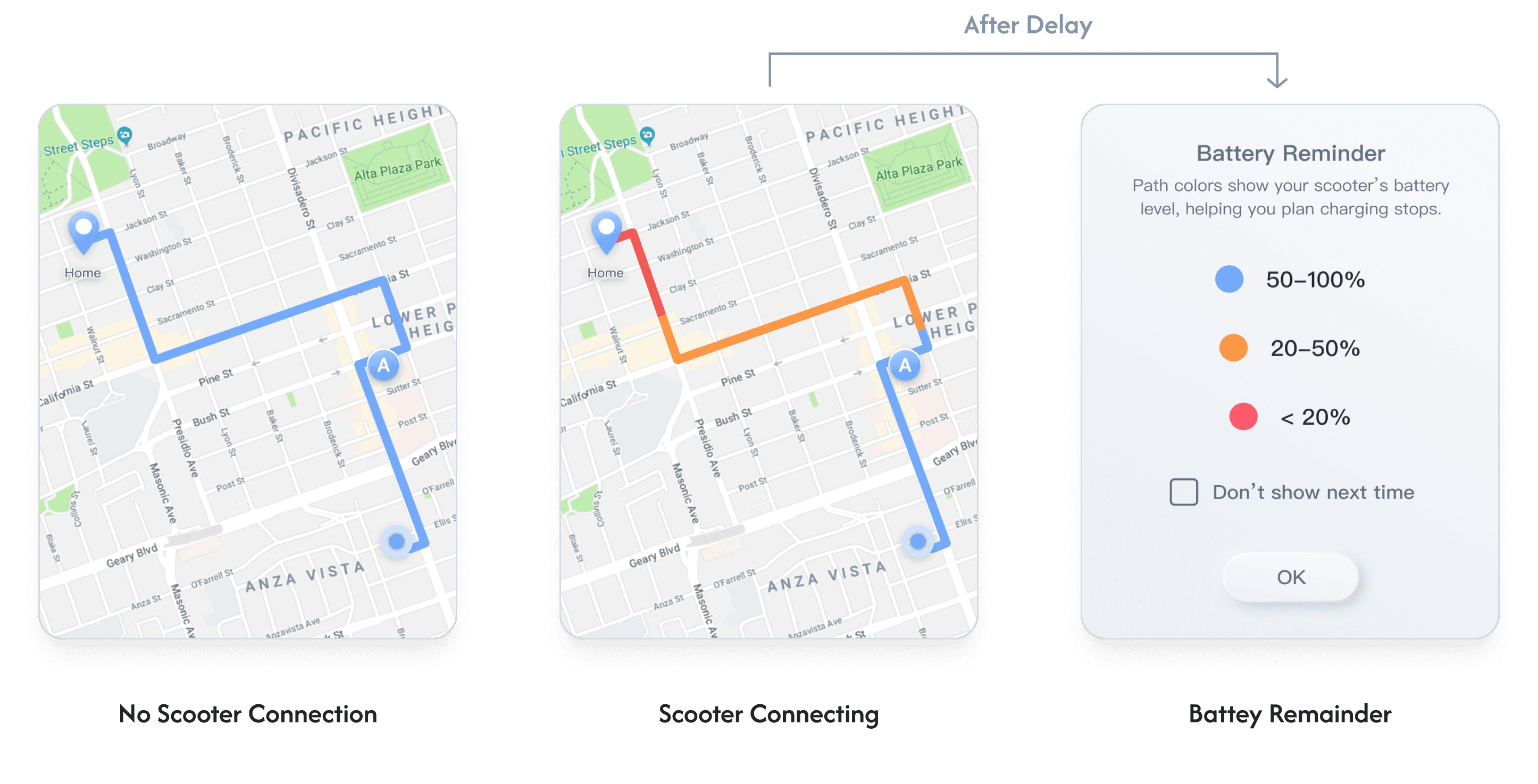
When the device is successfully connected to the scooter via Bluetooth, the system displays the scooter’s battery status on the navigation map using different path colors, allowing users to decide whether to charge or swap batteries.
Battery status is indicated by colors:
Blue: 50-100%
Blue: 50-100%
Orange: 20-50%
Orange: 20-50%
Red: Below 20%
Red: Below 20%
More intuitive charging navigation experience
More intuitive charging navigation experience
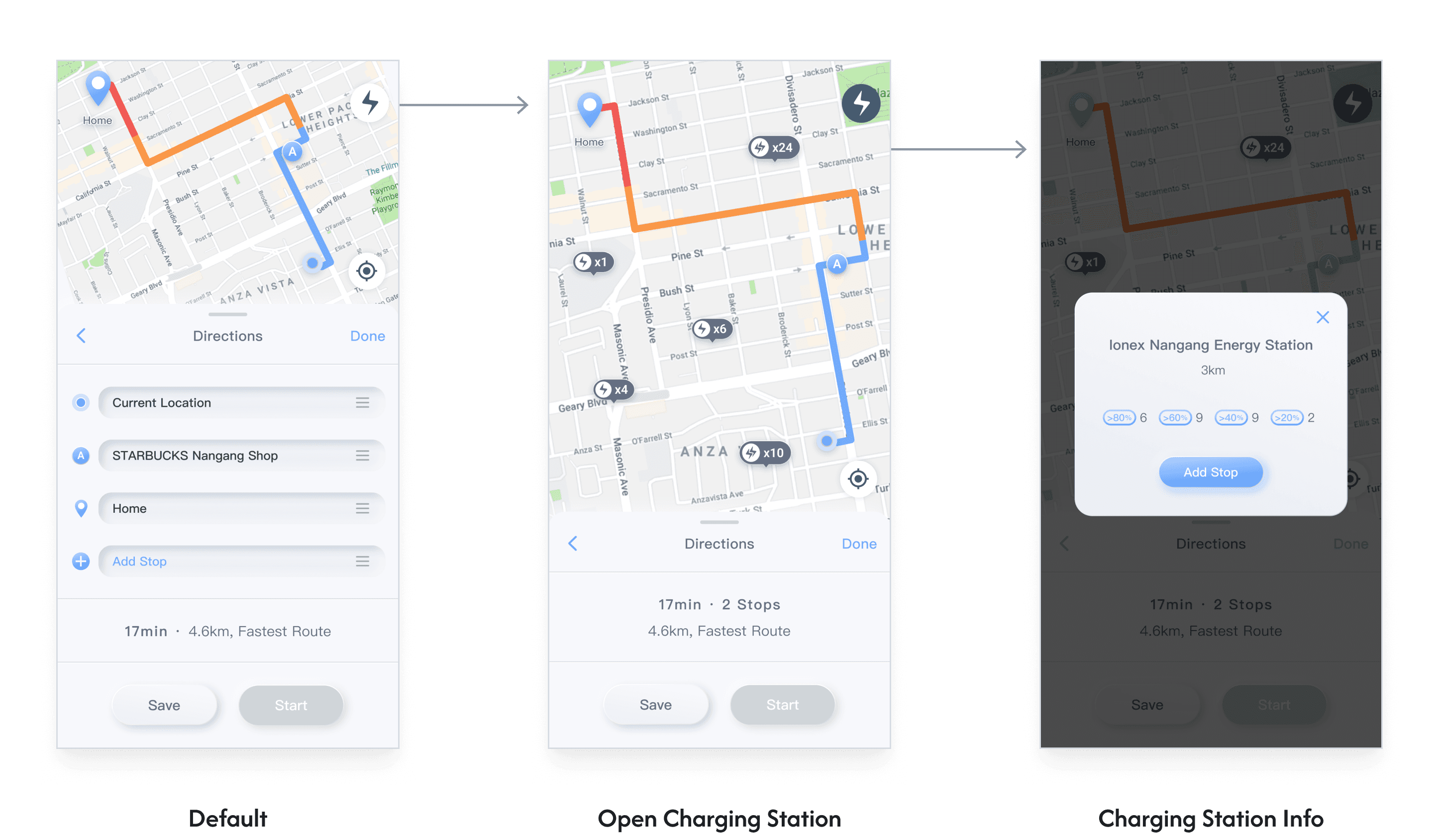
Charging stations are crucial for electric scooter riders, especially during long-distance rides, where the challenge of finding a charging station along the way often arises.
To ensure a more reassuring riding experience for users, we have added quick navigation to nearby charging stations on the map. Users can view the remaining battery count and power levels at each station, offering multiple options to choose from.
Charging stations are crucial for electric scooter riders, especially during long-distance rides, where the challenge of finding a charging station along the way often arises.
To ensure a more reassuring riding experience for users, we have added quick navigation to nearby charging stations on the map. Users can view the remaining battery count and power levels at each station, offering multiple options to choose from.
Save Your Favorite Places
Save Your Favorite Places
Easily add your home, workplace, or other frequent destinations to your list for seamless one-tap navigation. You can also save new locations directly while searching, making navigation more intuitive and efficient, always ready for your next journey.
Easily add your home, workplace, or other frequent destinations to your list for seamless one-tap navigation. You can also save new locations directly while searching, making navigation more intuitive and efficient, always ready for your next journey.
Map Management
Map Management
Seamless maps anytime anywhere
Seamless maps anytime anywhere
Our maps work offline. Simply purchase and download the map to use it without an internet connection.
If you need maps for other countries, just buy and download them from the store, then restart iCore 5 Navigation to switch maps. Offline maps require an extra fee, but they work smoothly regardless of network signal, and will update automatically when connected to the internet.
Our maps work offline. Simply purchase and download the map to use it without an internet connection.
If you need maps for other countries, just buy and download them from the store, then restart iCore 5 Navigation to switch maps. Offline maps require an extra fee, but they work smoothly regardless of network signal, and will update automatically when connected to the internet.

Learning & Takeaway
Learning & Takeaway
This was my first independent project at the company, and it presented challenges in technical integration and cross-team collaboration. I was responsible for designing the navigation interface and addressing issues related to dashboard integration, ensuring software stability and scalability. I worked closely with the hardware team to resolve technical details.
Despite workflow bottlenecks, I proactively coordinated with teams to optimize processes and adjust priorities. While the project didn’t go live, I gained valuable experience in overcoming technical challenges and improving collaboration.
This project significantly contributed to my professional growth, particularly in balancing design and development and making decisions under uncertainty.
This was my first independent project, focused on designing the navigation interface and addressing dashboard integration challenges. I collaborated with the hardware team to ensure stability and scalability.
Although the project didn’t launch, it enhanced my skills in collaboration, technical problem-solving, and balancing design with development.
Thanks for reading!
Check out other projects ↓
Thanks for reading!
Check out other projects ↓